input
Input data files
Main input files - filenames.csv, input_data.scv, setoptions.csv (former excel sheets) and optional mSCOPE.csv
file |
content |
|---|---|
options |
|
filenames |
filenames for current simulation and for time-series |
inputdata |
values for input structs |
mSCOPE |
leaf traits per canopy layer: optional only used when |
To find out ranges and units of input parameters take a look into input structs.
Pay extra attention to the simulation
Directories
Directories which name starts with dataset provide timeseries input: options.simulation == 1
dataset dat
Former style of timeseries run, when each parameter is provided in individual .dat file.
dataset for_verification
Newer style of timeseries run, when each parameter is provided in individual columns of single .csv file.
The file input_data_latin_hypercube_ts.csv was created with latin_hypercube_input(), which samples parameters within the borders specified in input_borders.csv.
As the name suggests, this data is used to run SCOPE for the very first time (verification run).
dataset mSCOPE_ts
‘dataset mSCOPE_ts’ contains time series of meteorological (meteo_ec_csv) and vegetation (vegetation_retrieved_csv) data
and an example of mSCOPE input file for timeseries mode (mSCOPE_csv).
If option timeseries is on we expect the user to have similar files in ‘./input/dataset X’.
meteo_ec_csv
ts_input.csv - a file with meteorological data (Rin, Rli, p, Ta, u, ea) and a timestamp f_date.
The timestamp is in berkeley format of eddy covariance (FLUXNET standard since 2015) - YYYYMMDD[HHMM].
In our example file half-hourly data are provided. It is possible to work with any time interval, but due to the thermal inertia of the soil, the calculation of soil temperature may not be accurate when the time interval is longer than three hours.
- As a sample of eddy covariance data in ‘berkeley’ format (FLUXNET standard since 2015)
ec_berkeley.csvis given. cab and lai columns where inserted to demonstrate how to avoid ‘vegetation_retrieved_csv’ (if you do not want our interpolation) but still provide changing vegetation parameters. The usage is demonstrated in
input_data_ec_cab_lai.xlsx.
vegetation_retrieved_csv
interpolatable.csv has time series of vegetation parameters Vcmax and Cab.
The time step here does not have to coincide with the one in the ‘meteo_ec_csv’ (but has to fully contain the latter), because values from ‘vegetation_retrieved_csv’ are interpolated to the time step of the ‘meteo_ec_csv’.
This file is optional.
This file can be made from the results of Retrieval (Model inversion): it is just enough to add a column with timestamp.
Warning
column name of the timestamp (t on filenames tab) in ‘meteo_ec_csv’ and ‘vegetation_retrieved_csv’ should be the same (TIMESTAMP_START, for example)
Excel truncates long integers (as timestamp) in .csv files => do not modify timeseries files with Excel or declare the column as text.
- we can calculated date from DOY and year for you:
provide t as decimal (julian) day of year (as in SCOPE < v1.74)
provide year column in your .csv
startDOY, endDOY must remain in YYYYMMDD[HHMM] format
Note
- SCOPE uses date for 2 things only:
- input/output:
subset your ‘meteo_ec_csv’ to startDOY, endDOY
write it into ‘fluxes.dat’, ‘surftemp.dat’, ‘radiation.dat’
- calculations:
- solar zenith angle (tts) if it is not provided
if your timeseries are from different places (lat, lon) you must provide tts
- to account for soil temperature from the previous step if
options.soil_heat_method == 0 if your timeseries are not ordered => set
options.soil_heat_method == 2
- to account for soil temperature from the previous step if
mSCOPE_csv
input_mSCOPE_timeseries.csv is also interpolatable. Columns - canopy layer parameters, rows - time.
directional
The input in the directory ‘directional’ is only used for multi-angle simulations (if the option ‘directional’ is switched on in parameters. In this directory one can provide the observer’s zenith and azimuth angles. The files in this directory have two columns: the first column is the observer’s zenith angle, the second the observer’s azimuth (relative to that of the sun, counterclockwise), both in degrees. If the option directional is switched on, SCOPE will calculate the radiance spectrum in all directions given in the input file.
fluspect_parameters
In this directory, absorption spectra of different leaf components are provided, according to PROSPECT 3.1, as well as Fluspect input: standard spectra for PSI and PSII.
leafangles
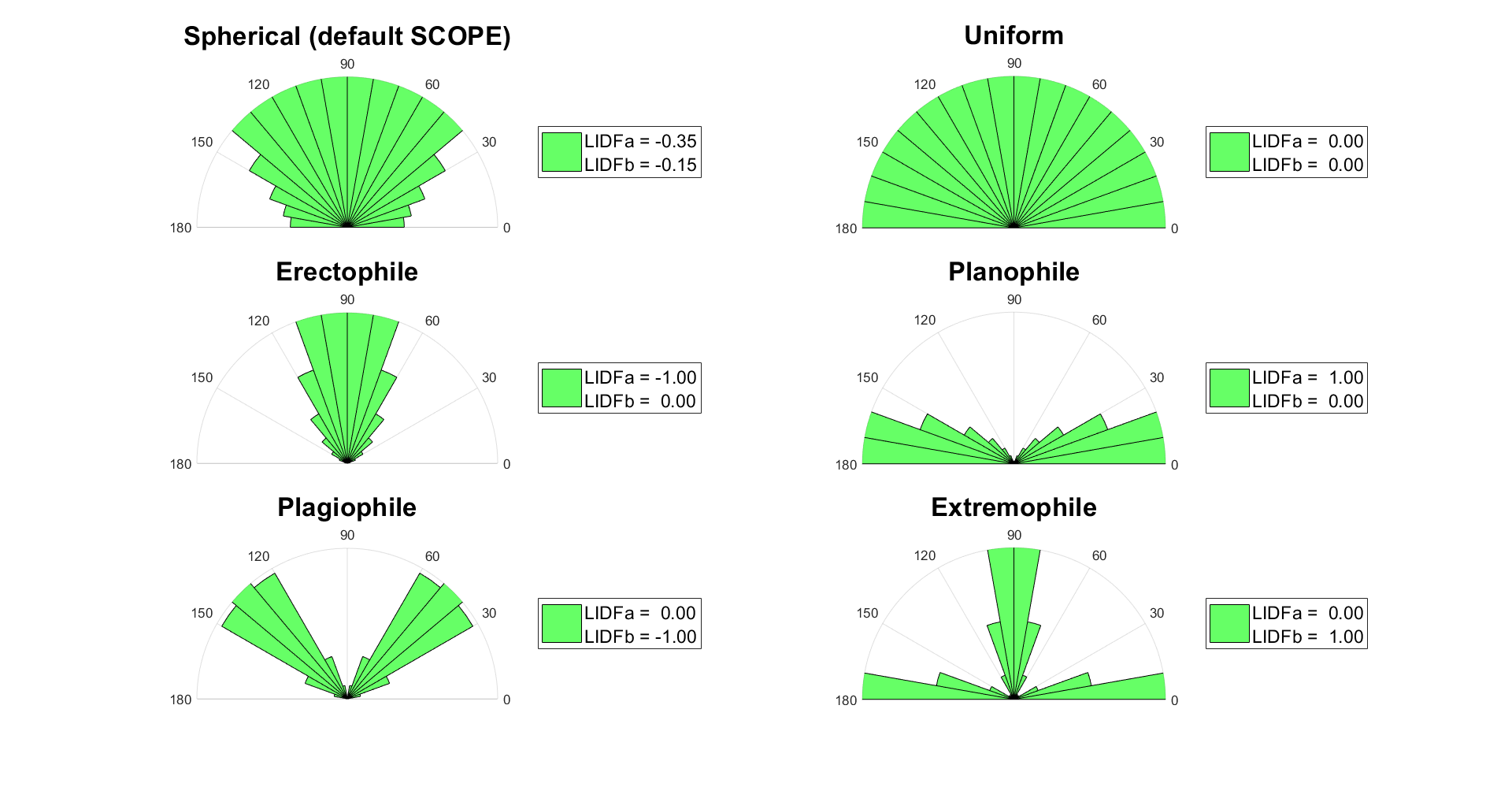
In this folder, example leaf inclination distribution data are provided. It is possible to use these distributions instead of the leafinclination model of Verhoef (1998 [6]) with the two parameters LIDFa and LIDFb. In that case, provide a filename in the input_data.xlsx tab filenames or the file filenames.m.
Possible leaf angle distributions (LADs) that can be created using LIDFa and LIDFb are presented in:
radiationdata
RTMo.m calculates spectra based on MODTRAN5 outputs (T-18 system, [7]). One .atm (atmospheric) file is provided in the data, 12 more are provided separately in a different .zip folder (in order to minimize the size of the SCOPE package, these are not provided standard). Note that in the input data (files as well as the spreadsheet), the broadband input radiation may be provided. SCOPE linearly scales the input spectra of the optical and the thermal domain in such a way, that the spectrally integrated input shortwave and long wave radiation matches with the measured values. A limitation of this approach is that the same shape of the input spectrum is used independent on the atmospheric conditions. If this scaling is not wanted, then leave ‘Rin’ and ‘Rli’ empty in the spreadsheet.
Note
In earlier versions of the model (1.34 and older), two input spectra of solar and sky radiation were provided (rad.txt and rad2.txt) in this directory. The data were calculated with MODTRAN4. The ASCII file in this directory consisted of three columns containing the following. The first column contained the wavelength in nm, the second column the solar radiation in W m-2 μm-1, and the third column the sky radiation in W m-2 μm-1. These data are now obsolete (since version 1.40).
soil_spectra
In this directory, the soil spectrum is provided. The ASCII file in this directory consists of two columns containing the following: The first column contains the wavelength in μm, the following columns reflectance spectra. Note that it is also possible to simulate a soil reflectance spectrum with the BSM model. In that case the values for the BSM model parameters are taken from the input data, and the archived spectra in this folder are not used.